Azure Flex Consumption Functions went GA in November 2024. We have been using them extensively since they came out in public preview in May 2024, and we are very happy about this addition to the Azure Function SKU options.
When considering moving your Azure Functions to Flex Consumption, some limitations must be considered. These are described in the Flex Consumption hosting documentation.
However, in some cases, the limitations can be mitigated. Below, I will describe how to mitigate some of the limitations with very few lines of code.
Load certificates for HttpClients
In Flex Consumption, it is currently not supported to load certificates from the managed certificate store using the app setting linked to an Azure Key Vault certificate.
However, you can still access Key Vault certificates from your Functions in Flex Consumption if you need to.
A very common use case is to load the certificates from a key vault to use them with client certificate authentication in an HttpClient. To solve this use case in a Flex Consumption app, you can refer to the certificate in from a key vault using the secret URL of the certificate. If you refer to the secret URL of a key vault certificate, you get the certificate as a Base64-encoded string, which you can decode and add as a client certificate when you configure your client.
In your app settings, e.g. in Bicep, refer to the secret like this:
Settings__Certificate: '@Microsoft.KeyVault(SecretUri=https://myvault.vault.azure.net/secrets/mycertificate)'Notice the /secrets/ path in the URL and not /certificates/. Even though this is stored as a certificate in the vault, you can access it through the secrets API to retrieve it as a Base64 encoded string.
Then, using the Base64 encoded string in an app setting, you configure the HttpClient as follows in your Program.cs:
using System.Security.Cryptography.X509Certificates;
using Microsoft.Extensions.DependencyInjection;
using Microsoft.Extensions.Hosting;

var host = new HostBuilder()
	.ConfigureFunctionsWebApplication()
	.ConfigureServices(s =>
	{
		s.AddOptionsSection<MySettings>("Settings");
		var settings = s.GetOptions<MySettings>();

		s.AddHttpClient<MyService>()
			.ConfigurePrimaryHttpMessageHandler(() =>
			{
				var handler = new HttpClientHandler { UseCookies = true, ClientCertificateOptions = ClientCertificateOption.Manual };
				var certificate = new X509Certificate2(Convert.FromBase64String(settings.Certificate));
				handler.ClientCertificates.Add(certificate);
				return handler;
			});
	})
	.Build();

await host.RunAsync();Cipher suites
On Flex Consumption, I have found that the set of default TLS Cipher Suites is more restrictive than what is configured per default in Consumption and Premium plans.
If you see errors from the runtime like Interop+Crypto+OpenSslCryptographicException and The SSL connection could not be established, see inner exception. Authentication failed, see inner exception. SSL Handshake failed with OpenSSL error - SSL_ERROR_SSL. error:0A000410:SSL routines::sslv3 alert handshake failure when calling and external API’s that do not support TLS1.3, I suggest you try the following:
Use ssllabs.com to get the list of supported cipher suites by the external endpoint: https://www.ssllabs.com/ssltest/
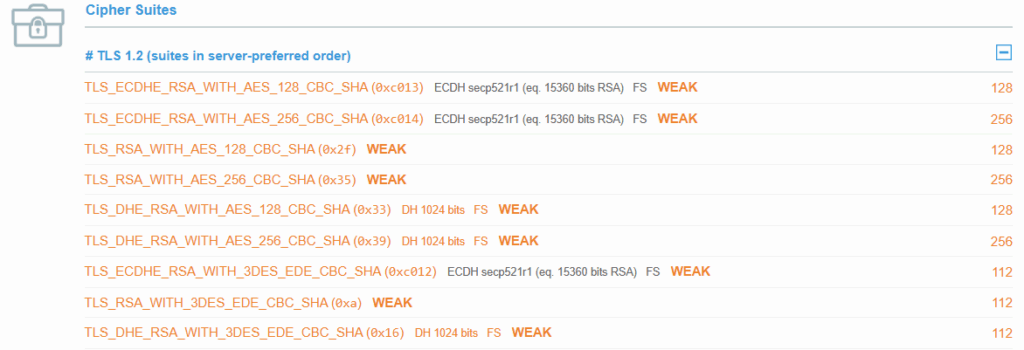
WARNING: The code below will modify, and, most likely, weaken, the security of your outbound HTTP calls. Only do this if you have to, and have no control over cipher suites of the remote API.
Configure the TLS Protocol and Cipher Suites on the HttpClient handler using the SocketsHttpHandler as shown below:
using System.Net.Security;
using Microsoft.Extensions.DependencyInjection;
using Microsoft.Extensions.Hosting;

var host = new HostBuilder()
  .ConfigureFunctionsWebApplication()
  .ConfigureServices(s =>
  {
    s.AddHttpClient("tls1.1").ConfigurePrimaryHttpMessageHandler(() =>
    new SocketsHttpHandler()
    {
      SslOptions = new SslClientAuthenticationOptions
      {
        EnabledSslProtocols = System.Security.Authentication.SslProtocols.Tls12 | System.Security.Authentication.SslProtocols.Tls13,
        CipherSuitesPolicy = new CipherSuitesPolicy(
        new[]
        {
          // Default
          TlsCipherSuite.TLS_ECDHE_ECDSA_WITH_AES_256_GCM_SHA384,
          TlsCipherSuite.TLS_ECDHE_ECDSA_WITH_AES_128_GCM_SHA256,
          TlsCipherSuite.TLS_ECDHE_RSA_WITH_AES_256_GCM_SHA384,
          TlsCipherSuite.TLS_ECDHE_RSA_WITH_AES_128_GCM_SHA256,
          TlsCipherSuite.TLS_ECDHE_ECDSA_WITH_AES_256_CBC_SHA384,
          TlsCipherSuite.TLS_ECDHE_ECDSA_WITH_AES_128_CBC_SHA256,
          TlsCipherSuite.TLS_ECDHE_RSA_WITH_AES_256_CBC_SHA384,
          TlsCipherSuite.TLS_ECDHE_RSA_WITH_AES_128_CBC_SHA256,

          // Additional suites (replace with your own)
          TlsCipherSuite.TLS_ECDHE_RSA_WITH_AES_128_CBC_SHA,
          TlsCipherSuite.TLS_ECDHE_RSA_WITH_AES_256_CBC_SHA,
          TlsCipherSuite.TLS_RSA_WITH_AES_128_CBC_SHA,
          TlsCipherSuite.TLS_RSA_WITH_AES_256_CBC_SHA,
          TlsCipherSuite.TLS_DHE_RSA_WITH_AES_128_CBC_SHA,
          TlsCipherSuite.TLS_DHE_RSA_WITH_AES_256_CBC_SHA,
          TlsCipherSuite.TLS_ECDHE_RSA_WITH_3DES_EDE_CBC_SHA,
          TlsCipherSuite.TLS_RSA_WITH_3DES_EDE_CBC_SHA,
          TlsCipherSuite.TLS_DHE_RSA_WITH_3DES_EDE_CBC_SHA,
          TlsCipherSuite.TLS_AES_128_GCM_SHA256,
        }),
      },

    });
  })
  .Build();

await host.RunAsync();Accessing network-restricted Key Vaults
A current limitation of Flex Consumption at the time of writing (April 2025) is that you are unable to access secrets in a network-restricted Azure Key Vault through by using the SecretUri reference in the app settings of the Function App as follows: Microsoft.KeyVault(@SecretUri=https://myvault.vault.azure.net/secrets/mysecret)
Instead, you can use the Key Vault SDK to retrieve the secrets from code with the following code in your Program.cs:
using Azure.Identity;
using Azure.Security.KeyVault.Secrets;
using Microsoft.Extensions.DependencyInjection;
using Microsoft.Extensions.Hosting;

var host = new HostBuilder()
    .ConfigureFunctionsWorkerDefaults()
    .ConfigureServices(services =>
    {
        var keyVaultUri = "https://myvault.vault.azure.net/";
        services.AddSingleton(new SecretClient(new System.Uri(keyVaultUri), new DefaultAzureCredential()));
    })
    .Build();

await host.RunAsync();Now, you can inject the SecretClient into your services where needed.
I expect this to be a temporary limitation, but now you have a much better alternative than removing the network restrictions from the Key Vault.